Elentra is the learning management system (LMS) used by the Undergraduate and Postgraduate medical programs at UBC.
FAQs
-
I cannot log into Elentra with my CWL login account
New Learner accounts are created prior to each academic year start date.
Troubleshooting steps:
1. If you are connecting off-campus, ensure Multi-Factor Authentication (DUO) is set up and authenticates successfully.
2. Log in to your CWL account at www.myaccount.ubc.ca -> If there is any message highlighted in yellow, please follow the instructions.
3. Log in to Elentra using the same CWL credentials and this link: https://ubc.elentra.cloud/
4. If it fails, clear cache & cookies on Chrome and try to log in again.
5. If it fails, open Chrome in incognito mode and try again.
If you still experience any issues, please submit a support ticket. Ensure to include your CWL username, a full screenshot of the error message and the URL. -
How can I recover my CWL password to log in to Elentra?
Use the password recovery system to recover your CWL password: https://it.ubc.ca/services/accounts-passwords/campus-wide-login-cwl/using-password-recovery-system
-
A link to a page or a document in Elentra fails to open.
Follow these instructions to access the desired folder or document within Elentra:
A. Prior to opening the link, ensure that you are logged in to Elentra.
B. Alternatively, you can navigate within Elentra to locate the specific folder or document you wish to access.
C. If the above does not resolve the issue, please contact your local Program Administrator.
-
I am unable to access any of the lab resources. When I click on the links, it directs me to a blank page.
Troubleshooting steps:
- This issue is typically caused by plug-ins like AdBlock. To resolve it, please ensure that you do not have any such plug-ins enabled. You can find instructions on how to temporarily disable the AdBlock plug-in here.
- A lot of lab resources are PDF files, make sure your browser has a PDF view functionality enabled. Learn how to use the Chrome PDF viewer in here.
-
I cannot see folders in my courses
This issue is typically caused by plug-ins like AdBlock. To resolve it, please ensure that you do not have any such plug-ins enabled.
You can find instructions on how to temporarily disable the AdBlock plug-in here.
-
How can I update my profile information?
To update your name, email address, or profile photo, please submit a request to UBC Elentra Support. Please note, email addresses must align with UBC’s trusted domain list.
-
I cannot access Panopto, my credentials are not accepted
If you cannot access your Panopto account or require technical assistance, please contact the MedIT Service Desk at medit.servicedesk@ubc.ca.
-
I cannot log into Elentra with my CWL login account
New Learner accounts are created prior to each academic year start date.
Troubleshooting steps:
1. If you are connecting off-campus, ensure Multi-Factor Authentication (DUO) is set up and authenticates successfully.
2. Log in to your CWL account at www.myaccount.ubc.ca -> If there is any message highlighted in yellow, please follow the instructions.
3. Log in to Elentra using the same CWL credentials and this link: https://ubc.elentra.cloud/
4. If it fails, clear cache & cookies on Chrome and try to log in again.
5. If it fails, open Chrome in incognito mode and try again.
If you still experience any issues, please submit a support ticket. Ensure to include your CWL username, a full screenshot of the error message and the URL. -
How can I recover my CWL password to log in to Elentra?
Use the password recovery system to recover your CWL password: https://it.ubc.ca/services/accounts-passwords/campus-wide-login-cwl/using-password-recovery-system
-
My Elentra session changed, I no longer have my resident dashboard; instead it shows what I saw as an Undergrad medical learner.

Desktop: Use the Org Switcher feature to ensure that your Elentra session is in the “PGME Student” organization.
Mobile App: If you are using the Elentra app, please see the mobile app guide for instructions.
-
I recently started a new residency program, and my Elentra Dashboard has not yet been updated with my new program.
Reach out to your Residency Program Administrator.
-
Where can I find the requirements for each EPA assessment plan on my CBME Dashboard?
A badge on each EPA displays your progress towards meeting assessment plan requirements in each program’s Specialty Committee EPA Guide. These numbers are updated once every 24 hours.
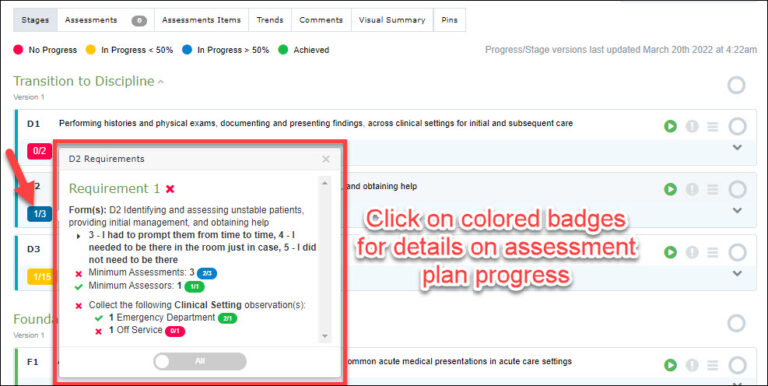
Visit the CBME in Elentra: Resident Guide for a detailed overview of the CBME Dashboard.
-
I cannot add an Undergrad medical student to the assessors list, I get the error “The email is already in use by another account”.
To add the Undergrad student to the assessors list, use an alternative email address that is not their @student.ubc.ca email and add them as an External Assessor. Visit this page to learn more about adding External Assessors
-
I cannot open the SAMP exam, I get an error.

Use the Org Switcher feature to ensure that your Elentra session is in the “PGME Student” organization, then try to access the SAMP exam.
-
How can I update my profile information?
To update your name, email address, or profile photo, please submit a request to UBC Elentra Support. Please note, email addresses must align with UBC’s trusted domain list.
-
A link to a page or a document in Elentra fails to open.
Follow these instructions to access the desired folder or document within Elentra:
A. Prior to opening the link, ensure that you are logged in to Elentra.
B. Alternatively, you can navigate within Elentra to locate the specific folder or document you wish to access.
C. If the above does not resolve the issue, please contact your local Program Administrator.
-
I cannot log in to Elentra with my CWL login account
Elentra accounts are not issued automatically. If you do not currently have an account in Elentra and require access, please submit a request to the Elentra Support Team
Troubleshooting steps:
1. If you are connecting off-campus, ensure Multi-Factor Authentication (DUO) is set up and authenticates successfully.
2. Log in to your CWL account at www.myaccount.ubc.ca -> If there is any message highlighted in yellow, please follow the instructions.
3. Log in to Elentra using the same CWL credentials and this link: https://ubc.elentra.cloud/
4. If it fails, clear cache & cookies on Chrome and try to log in again.
5. If it fails, open Chrome in incognito mode and try again.
If you still experience any issues, please submit a support ticket. Ensure to include your CWL username, a full screenshot of the error message and the URL. -
How can I recover my CWL password to log in to Elentra?
Use the password recovery system to recover your CWL password: https://it.ubc.ca/services/accounts-passwords/campus-wide-login-cwl/using-password-recovery-system
-
How can I get a CWL account?
Contact your designated site coordinator for assistance in obtaining a CWL (Campus Wide Login) account. They will help you with setting up your account.
-
My Elentra session changed, I no longer have my faculty functionalities.

Use the Org Switcher feature to ensure that your Elentra session is in the appropriate “Faculty” organization.
-
How can I update my profile information?
To update your name, email address, or profile photo, please submit a request to UBC Elentra Support. Please note, email addresses must align with UBC’s trusted domain list.
-
How can I get my assessor PIN?
See “Setting a PIN for in-the-moment EPA completion” in the link below: https://postgrad.med.ubc.ca/competency-based-medical-education/entrada-user-guide-faculty/
-
I need help opening EPA links. I get the error “you do not have permission to view this assessment” when I click on the EPA link to complete the assessment.
Open the link in an incognito mode window.
Learn how to open Chrome in incognito mode here.
Note that this issue typically occurs when the assessor has two accounts on Elentra; i.e. a faculty account and an external account. Reach out to CBME support for assistance with merging these accounts.
-
I cannot access undergraduate course websites
If you receive an error while trying to access an undergraduate course website, please submit a support request.
-
I cannot log in to Elentra with my CWL login account
Elentra accounts are not issued automatically. If you do not currently have an account in Elentra and require access, please submit a request to the Elentra Support Team
Troubleshooting steps:
1. If you are connecting off-campus, ensure Multi-Factor Authentication (DUO) is set up and authenticates successfully.
2. Log in to your CWL account at www.myaccount.ubc.ca -> If there is any message highlighted in yellow, please follow the instructions.
3. Log in to Elentra using the same CWL credentials and this link: https://ubc.elentra.cloud/
4. If it fails, clear cache & cookies on Chrome and try to log in again.
5. If it fails, open Chrome in incognito mode and try again.
If you still experience any issues, please submit a support ticket. Ensure to include your CWL username, a full screenshot of the error message and the URL. -
How can I recover my CWL password to log in to Elentra?
Use the password recovery system to recover your CWL password: https://it.ubc.ca/services/accounts-passwords/campus-wide-login-cwl/using-password-recovery-system
-
My Elentra session changed, I no longer have my staff functionalities.

Use the Org Switcher feature to ensure that your Elentra session is in the appropriate “Staff” organization.
-
I cannot access undergraduate course websites
If you receive an error while trying to access an undergraduate course website, please submit a support request.
-
A link to a page or a document in Elentra fails to open.
Follow these instructions to access the desired folder or document within Elentra:
A. Prior to opening the link, ensure that you are logged in to Elentra.
B. Alternatively, you can navigate within Elentra to locate the specific folder or document you wish to access.
C. If the above does not resolve the issue, please contact your local Program Administrator.
-
How can I give a person VIEW access to a community in Elentra?
You can find instructions here: https://education.med.ubc.ca/edtech-resources/community-administration-on-elentra/
-
How can I give a person EDITOR access to a community in Elentra?
You can find instructions here: https://education.med.ubc.ca/edtech-resources/community-administration-on-elentra/
-
A resident has recently started a new residency program, and their Elentra Dashboard has not been updated to reflect the new program.
In RMS, verify the “Current Program”, “Start Date” and “Promotion Date” of the resident.
Note that the Residency Program and Dashboard on Elentra will be updated on this specific date and not before.
Workaround:
Manually add the residents to the new program course list on Elentra.
If you need help with this, contact the CBME Elentra Support
If the designated date has passed, and Elentra has not been updated accordingly, please submit a support ticket.
-
I need help with Panopto
If you would like to request a Panopto account, create a departmental folder, or adjust access to a folder, please fill out the following form:https://ubc.ca1.qualtrics.com/jfe/form/SV_ac53HZlIZlwfYdo
For inquiries about the use of Panopto recordings in an educational context, please email us at edmedia.med@ubc.ca
Need To Ask Us a Question?